Switch from packwizard
A packwizard alternative built for the phone in your hand.
Same gear list, same workflow. PMB adds optional-item swaps for seasonal pack variations, base weight goal tracking, and an AI auto-organize pass, all in an editor that actually works on a phone.
Free to plan and share. No account required to start.
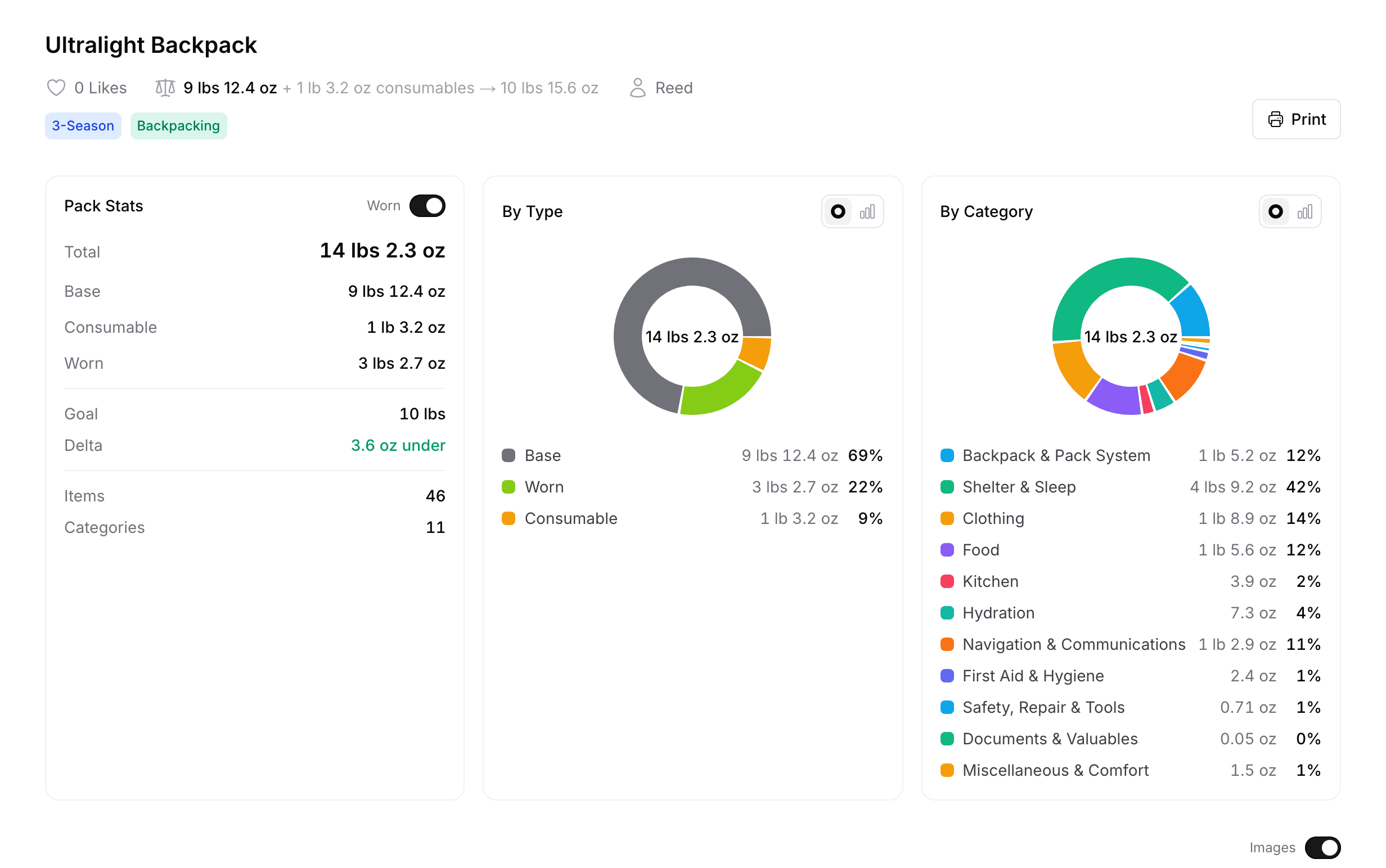
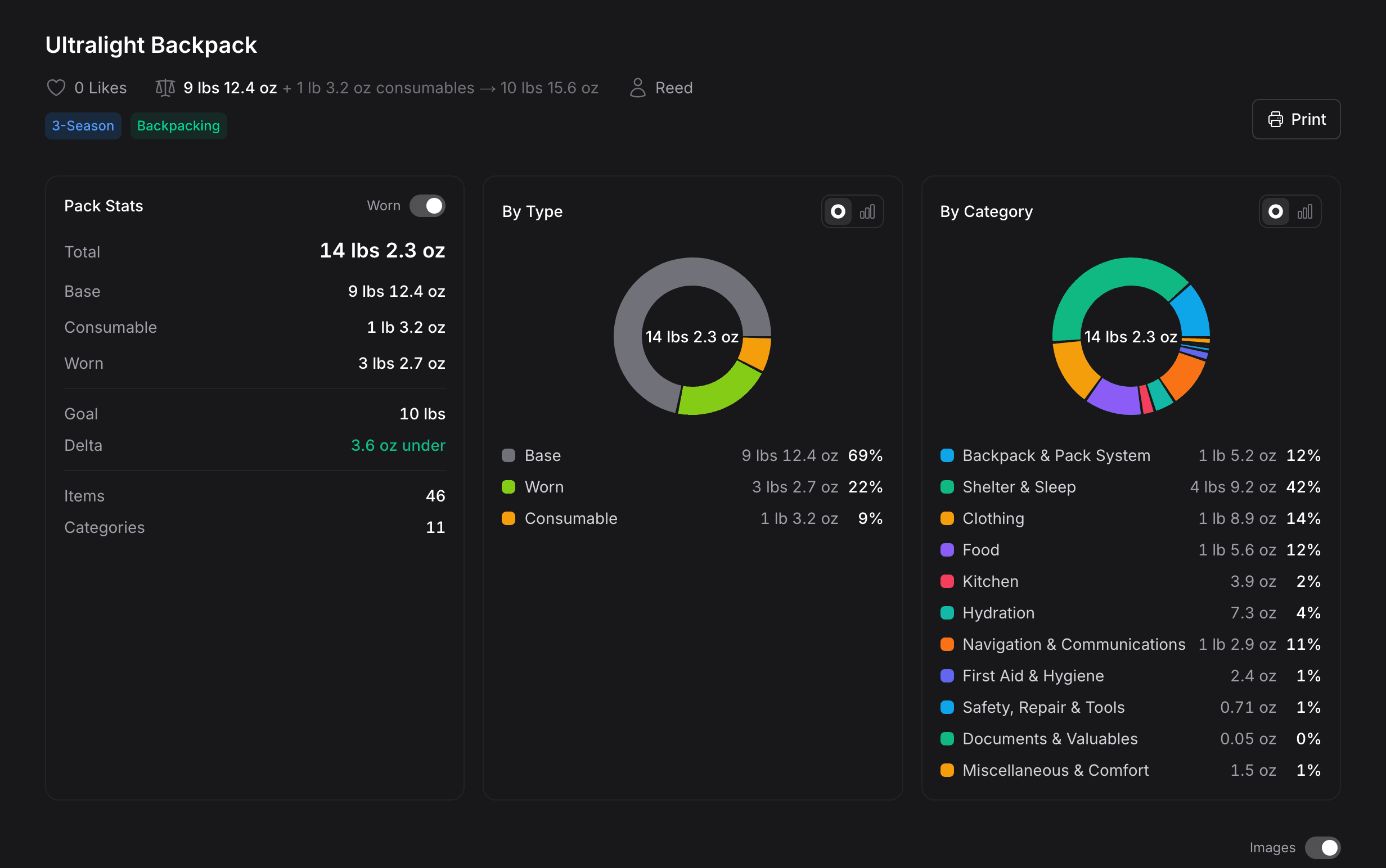
PMB vs packwizard at a glance
| Compare features | PMB | packwizard |
|---|---|---|
| Importing | ||
| Bulk CSV import | ||
| Pack composition | ||
| Categories, worn, and consumable flags preserved | ||
| Optional items for seasonal pack swaps | Limited | |
| Base weight goal / target | Limited | |
| Consumables scale by trip length (per day/night) | ||
| Sharing | ||
| Create AND share without an account | ||
| Trip planning & group gear | ||
| Multi-user trips (invite & join) | ||
| Split shared gear across the group | ||
| True per-member carry (no double-counted weight) | ||
| Carry-balance view (see who carries what) | ||
| Trip dates + shared logistics notes (permit, trailhead) | ||
| Workflow | ||
| Auto-organize via AI | ||
| UX | ||
| Mobile-first edit UX | Limited | |
| Always-on quick-add row | Limited | |
| Start from a curated template | ||
| Pricing & policy | ||
| Price | Free | Free |
| Ad-free | ||
Built for the group, not just a solo list
packwizard is a single-user builder. PMB adds shared trips: divide group gear across the party and balance the load at a glance, so the tent, stove, and food don't all land on one person's back.
John Muir Trail
A three-week thru-hike of the John Muir Trail, with the shared gear split so every pack stays light.
Notes
Only trip members can see thisWilderness permit #JMT-0142 · meet at Whitney Portal, 6am
- Group total
- 52lbs9.6oz
- Base weight
- 45lbs3.2oz
- Per person
- 17lbs8.5oz
- Shared gear
- 5
Carry balance
BaseConsumable
- Marcus Hale20lbs12.8oz
- Dana Whitfield19lbs12.8oz
- Jesse Lin12lbs
Lightest Jesse Lin 12lbs · heaviest Marcus Hale 20lbs12.8oz
What you get when you switch
Three features ultralight planners ask for once they hit the limits of a desktop tool.
Built mobile-first
Edit weights, reorder items, and swap categories from a phone on the trail. The full pack view fits a single screen and stays usable when your hands are cold.
Optional swaps
Mark items as optional to plan seasonal pack variations from one source-of-truth list. No more cloning the whole pack to swap a shelter or layer.
Auto-organize in one pass
An AI pass that reads your gear list and sorts it into clean categories in a single click. Skip the manual setup; tweak the result if you want.
How to bring your pack over
Three steps from a packwizard CSV to a PMB pack you can edit and share.
- Step 1
Export your packwizard pack
Use packwizard's CSV export from your pack's Options menu. You get a flat file with name, brand, weight, category, worn / consumable.
- Step 2
Upload the CSV to PMB
Drop the file in PMB's importer. We read the standard ultralight pack columns; light cleanup only if your column names differ.
- Step 3
Edit, share, repeat
Your new pack is editable immediately and shareable as a clean image. No account required to start.
Questions about switching
- Is Plan My Backpack free? Toggle answer
- Yes. Planning, sharing, and importing are free.
- How do I migrate my packwizard pack to PMB? Toggle answer
- Export your packwizard pack as a CSV from packwizard, then upload it via PMB's CSV importer. PMB reads the standard ultralight pack columns (name, brand, weight, category, worn, consumable) so most data comes over directly. Some columns may need light cleanup if packwizard's export names them differently.
- Do I need an account? Toggle answer
- No. You can create or import a pack as a guest, and the shareable URL works immediately. Your pack lives on a cookie for 30 days of inactivity; we show a banner with the remaining time as the deadline approaches, and you can claim it into a permanent account at any point before then. (Note: packwizard saves anonymous packs only to your local computer and requires an account before you can share a link.)
- Will my packwizard URL still work after I migrate? Toggle answer
- Yes. PMB does not touch your packwizard account. Your original URL keeps working as long as packwizard does. Many users keep both live for a while during the switch.
- Does PMB have ads? Toggle answer
- No. PMB does not run display advertising. Affiliate links to retailers are disclosed inline and only appear on gear rows we have curated.
Bring your packwizard pack to PMB
Import in a few minutes, then keep editing on a phone. Free to plan and share.